Agents & Hubs
Page that gathers the components that collect data for the platform. They are the bridge between the customer environment (servers, devices, applications) and SpecialOne: without an agent and without a collector, nothing reaches here.
Reach it from Administration → Agents & Hubs.
Who sees this page
Only users with tenant admin role. Regular operators and end users do not see the item on the menu and cannot open the URL directly.
Agent vs Collector
Two distinct components with complementary roles:
| Component | Where it runs | What it does |
|---|---|---|
| Agent | Inside the monitored host (Linux or Windows). | Reads local metrics: CPU, memory, disk, processes, services, logs. Sends them to a collector. |
| Collector (Hub) | On a machine inside the customer network, or on the SpecialOne cloud. | Acts as an intermediate collection point: runs external checks (HTTP, ICMP, SNMP), talks directly to databases and network devices, and routes everything coming from local agents to the platform. |
A tenant may have as many collectors as needed. The call between one or several depends on the topology: a simple environment runs everything on a single collector; segmented networks (DMZ, geographically separated datacenters, branch offices) benefit from one collector per segment.
SpecialOne default cloud collector
Every tenant is born with a pre-provisioned collector called SpecialOne default cloud collector. It:
- Runs on SpecialOne infrastructure, with no installation or maintenance cost for the customer.
- Is read-only: the tenant cannot edit or delete it.
- Appears on the list with Edit and Delete actions disabled, and no collector package available for download (it makes no sense to download something that is already running hosted).
When to use the cloud collector:
- Synthetic checks (HTTP, ICMP, DNS) against public targets.
- Monitor APIs and endpoints exposed on the internet.
- Early proof-of-concept scenarios when the customer has not installed a local collector yet.
When it is not enough:
- Collect from hosts on private networks that do not expose a port to the internet.
- Poll SNMP on internal switches and routers.
- Monitor databases and storage that only accept connections from their own network.
- Meet compliance rules that forbid data leaving the perimeter before passing through a local control point.
In these cases, install a local collector on the customer network. It complements (does not replace) the default cloud collector.
The list
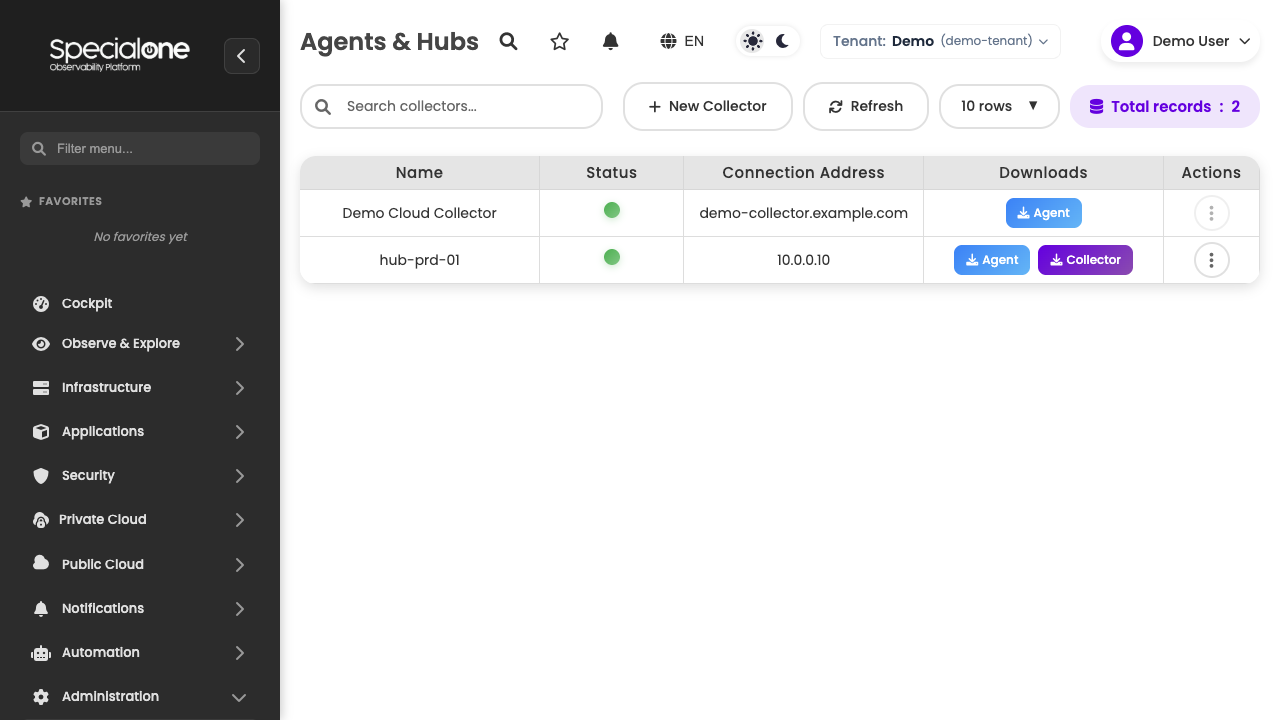
The screen is a table with every collector on the current tenant.
| Column | Content |
|---|---|
| Name | How the collector appears on the platform. The SpecialOne default cloud collector is pinned at the top. |
| Status | Colored circle with the health state (see Health states). |
| Connection Address | IP or hostname through which the platform reaches the collector. |
| Downloads | Dropdown with the available packages (Windows agent, Linux agent, collector). |
| Actions | Dropdown with Edit and Delete. Disabled for the default cloud collector. |
Above the table sit the controls:
- Search by collector name.
- New Collector: opens the create modal.
- Refresh: forces a reload of the data.
- Rows per page: 5, 10, 25, 50, 100 or All.
The table refreshes itself every 3 minutes, aligned with the window used to compute online/offline.
Health states
The circle on the Status column is calculated from the collector's last contact with the platform:
| State | Color | Criterion |
|---|---|---|
| Online | Green | Collector responded within the last 3 minutes. |
| Offline | Gray | No response for more than 3 minutes. |
| Unknown | Gray | Collector registered but never completed the first communication. |
The 3-minute window is the same as the screen's auto-refresh: in practice, opening the page and clicking Refresh gives the freshest possible reading.
An offline collector halts collection
While a collector is Offline, every host assigned to it stops generating new metrics and alerts. Already open alerts keep visible on Alerts, but they neither close nor fire until the communication comes back. Treat offline as an incident: check the network, the firewall and the collector process on the machine.
Register a local collector
Click New Collector to open the modal:
The fields are:
- Name: friendly identifier (e.g.
hub-prd-sp,collector-dmz-ny). It shows up on every screen that references the collector. - Address: IP or FQDN through which the platform reaches the collector (e.g.
192.0.2.10,collector.example.com).
The modal shows a warning: "The collector will need to be reinstalled after editing its configuration". It applies to edits as well, not only registration.
Network prerequisites:
- Connectivity from the collector to the SpecialOne platform (HTTPS outbound on the standard port).
- Working DNS resolution, if the registered address is an FQDN.
- Firewall opening on the customer side so internal hosts can talk to the collector (agent port).
After Save, the collector shows up on the list with Unknown status until it completes the first communication. Then download the collector package from the row's Downloads menu and install it on the target machine, using the registered name and address.
Downloads and installation
The Downloads menu on each row delivers three packages:
| Package | Platform | When to download |
|---|---|---|
| Windows agent package | MSI installer | To install the agent on Windows hosts that will report to this collector. |
| Linux agent package | .deb and .rpm packages |
To install the agent on Linux hosts. |
| Collector package | Installer per distribution | To install the collector on a new machine in the customer network. Not available for the default cloud collector. |
General flow:
- Register the collector on the platform (if local).
- Download the collector package from the row menu and install it on the machine.
- For each host to be monitored, download the agent package matching the OS and install it, pointing to the registered collector address.
For the detailed walkthrough per operating system (RHEL, Debian, Ubuntu, Windows Server, Windows Desktop), install commands, validation and troubleshooting, see Install agent and collector.
Standardize installation through automation
For large fleets, wrap the agent installation in an Ansible playbook, Puppet module, GPO or provisioning script. The package itself is simple, but ensuring that every host points to the right collector is what usually turns into an operational headache.
Edit and manage
From the row Actions menu you can:
- Edit: opens the same registration modal, with name and address pre-filled. Saving triggers the reinstallation warning: after changing name or address, the collector must be reinstalled on the target machine to pick up the new contract.
- Delete: removes the collector from the platform. Does not work if there are still hosts assigned to it.
Restrictions on the default cloud collector:
- Edit and Delete show up disabled (gray, not clickable).
- The collector package does not appear on the downloads menu (you cannot install a collector that is platform-owned).
- Stays available to receive host assignments and synthetic checks normally.
Cannot delete a collector that has hosts
Before deleting a local collector, move every host on it to another collector (via the host's Configuration tab, responsible collector field). With hosts still assigned, the deletion is blocked to prevent leaving collection orphaned.
ACL
The whole page is restricted:
| Role | Access |
|---|---|
| Tenant Admin | Full within the tenant they are logged into. |
| Regular user / Operator | None: the menu item is hidden and the URL returns denial. |
Switching a host's collector (under Hosts → Configuration) also requires the admin role. This prevents an operator from reshuffling hosts across collectors without visibility into the impact.
Best practices
A few rules that separate a well-run tenant from one that struggles with collection gaps:
Default cloud for synthetic, local for the rest
Use the SpecialOne default cloud collector for synthetic checks against public targets and nothing else. For everything that lives inside the customer network (agents, SNMP on the network, databases, storage), keep at least one local collector.
One collector per network segment
In environments with DMZ, branches or geographically separated datacenters, deploy one collector per segment. It avoids crossing firewalls with monitoring traffic and isolates network incidents (a single collector failing does not drop collection for everyone else).
The collector name should tell the story
Standardize the name with role and location: hub-prd-sp-dc1, collector-dmz-ny, hub-customer-acme. On host screens, the collector name shows alongside and helps whoever is investigating understand where the data comes from (or stops coming from).
Next steps
-
Hosts
Every host is assigned to a collector. See how to register and configure them.
-
Network
Switches, routers and firewalls collected via SNMP by the local collector.
-
Synthetic
HTTP, ICMP and DNS checks running from the cloud or local collector.
-
Concepts
Platform vocabulary: agent, collector, monitoring profile, alert.